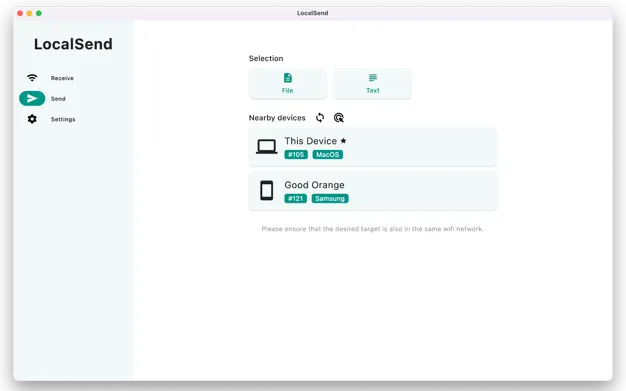
Ever needed to zap a photo from your Mac to your phone, or send a doc to a friend’s laptop, but Wi-Fi’s spotty and cables are nowhere in sight? LocalSend swoops in—a free, open-source app that makes file sharing between nearby devices as easy as a tap. Think AirDrop, but better: it works across Mac, Windows, Linux, iOS, and Android, no internet or account required. With end-to-end encryption, your files zip straight from device to device over your local network, keeping prying eyes out and privacy in. Whether you’re swapping pics with a pal, moving work files between your own gadgets, or helping a Linux-loving buddy, LocalSend spots nearby devices automatically and gets the job done with zero fuss. It’s your cross-platform, offline sharing hero—secure, simple, and totally free.
Why You’ll Love It
- Device to Device: Send files straight over—no middleman, no cloud.
- Everywhere: Runs on Mac, Windows, Linux, iOS, and Android.
- Locked Down: Keeps transfers encrypted from start to finish.
- No Sign-Up: Jump in without logins or accounts.
- Auto Magic: Finds nearby devices with no setup headaches.
What It Offers
- Sharing Smarts: Transfer files peer-to-peer, no internet needed.
- Wide Reach: Supports all major platforms in multiple languages.
- Privacy First: No servers, no tracking, just open-source goodness.
- Simple Flow: Clean interface—pick a file, pick a device, send.
- Free Forever: No ads, no fees, and community-driven updates.
Perfect For
- Techies: Share across mixed OS setups effortlessly.
- Friends: Swap pics or videos on the spot.
- Workers: Move files between work devices securely.
- Travelers: Share offline when Wi-Fi’s out of reach.
Get Started
- Download: Grab it free from LocalSend.
- Install: Drag it to Applications on your Mac and open it.
- Share: Pick a file, spot a nearby device, and hit send.
- Repeat: Use it anywhere, anytime—no net required.
System Requirements
- macOS 11 (Big Sur) or higher
- 4GB RAM minimum
- Works on Intel and Apple Silicon Macs
- Also on Windows, Linux, iOS, Android